Best Multi-Color 3D Printer for Small Business and Makers: Flashforge Creator 5 vs Creator 5 Pro vs QIDI Plus5 vs Plus4
Looking for a multi-color 3D printer that can keep up with real orders, not just weekend experiments? You're not alone. Buyers today want vivid color, strong engineering materials, and fast turnaround, all without babysitting every print or throwing away a pile of filament. The tricky part is that "multi-color" means very different things from one machine to the next. In this guide, we compare four popular options side by side: the Flashforge Creator 5, the Flashforge Creator 5 Pro, the QIDI Plus5, and the QIDI Plus4. By the end, you'll know how each one handles color, which one fits your workload, and where each one makes the most sense.
What Is a Multi-Color 3D Printer?
A multi-color 3D printer is an FDM machine that can print one model using more than one filament color or material. It does this either with several independent toolheads or with a feeder that swaps filaments through a single nozzle. Both approaches give you colorful parts, but they differ in speed, waste, and cost.
That difference matters more than most spec sheets admit. A fast multi-color 3D printer with low waste can pay for itself quickly if you sell prints. A slower one may still be perfect for a hobbyist. Let's break down the two main designs first.
Two Ways to Print in Color: Toolheads vs. Filament Feeders
Independent Toolheads
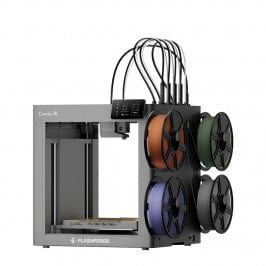
With this design, each color gets its own toolhead and nozzle. The printer simply switches to the next toolhead instead of unloading and reloading filament. The Flashforge Creator 5 and Creator 5 Pro use this approach, with four independent toolheads on each machine.
The benefits are clear:
- Faster color changes, because nothing needs to be unloaded mid-print
- Minimal purge waste, which lowers filament cost per part
- True multi-material 3D printer flexibility, such as pairing rigid and flexible filaments in one job
Single Nozzle with a Filament Feeder
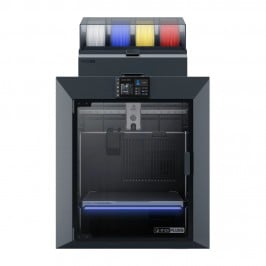
The QIDI machines take a different route. The QIDI Plus5 and QIDI Plus4 pair with the QIDI Box, a multi-spool unit that feeds filament to one nozzle. On the Plus5, you can chain up to four QIDI Boxes to reach 16 different materials. Swapping filament through a single nozzle usually involves some purging, but you gain a lot of color and material range in return.
It's a trade-off, not a winner and loser. Toolheads favor speed and low waste. Feeders favor huge color palettes and larger build volumes. Keep that in mind as we go through each printer.
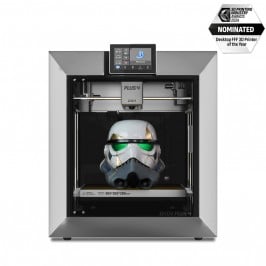
Flashforge Creator 5: A Fast, Low-Waste Multi-Color 3D Printer
The Flashforge Creator 5 is built around speed. Flashforge says its four-toolhead design delivers up to 500% faster multi-color printing than conventional single-nozzle tool changers, with zero purge waste. For anyone running an Etsy shop or a small print farm, that's a big deal.
Key Strengths
- Build volume: 256 × 256 × 256 mm
- Speed: up to 600 mm/s travel, 300 mm/s print speed, and 30,000 mm/s² acceleration
- Temperatures: up to 320 °C on the nozzles and 120 °C on the bed
- Automation: fully automatic bed leveling and toolhead offset calibration
- Nozzle options: 0.4 mm standard, with 0.25, 0.6, and 0.8 mm available
- Connectivity: dual-band Wi-Fi, USB, a built-in camera, and multi-printer fleet management
Who It Fits Best
The Creator 5 suits makers, educators, and small shops that want quick, clean color prints with very little waste. It uses an open-frame design, so if you plan to print ABS, ASA, or other engineering filaments, you'll want to add an enclosure. That's exactly the gap the Pro model fills.
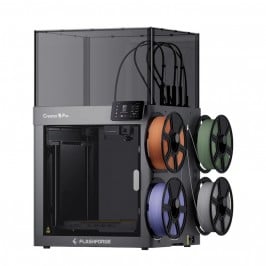
Flashforge Creator 5 Pro: The Enclosed Multi-Color 3D Printer
The Flashforge Creator 5 Pro keeps everything we like about the Creator 5 and wraps it in a fully enclosed, rigid frame. Its biggest upgrade is active chamber heating, which can reach 65 °C. That steadier environment helps with temperature-sensitive materials that tend to warp in open air.
What the Pro Adds
- Active chamber heating up to 65 °C, built into the machine
- Advanced air filtration with HEPA and carbon, plus a continuous airflow system
- Extra safety monitoring, including door-open detection and chamber temperature monitoring
- Chamber lighting for easier monitoring through the enclosure
- Lower noise: Flashforge notes the enclosed design reduces sound from about 65 dB to 55 dB
Quick tip: the Pro's chamber heater is part of the machine itself, so it can't simply be added to a standard Creator 5 later. If you know you'll print engineering filaments, it's usually smarter to start with the Pro.
Also worth knowing: the standard Creator 5 Pro configuration doesn't include an automatic multi-spool filament feeder. That's fine, because its four toolheads already handle color changes on their own.
Who It Fits Best
Choose the Pro if your home, classroom, or workshop needs cleaner air, lower noise, and reliable results with materials like ABS and ASA. It's a strong pick for professional small-batch production.
QIDI Plus5: A Large-Format Multi-Color 3D Printer
The QIDI Plus5 is the big-volume option in this group. It offers a 320 × 320 × 300 mm build space, which QIDI describes as 18% more than before, so you can print larger props, enclosures, or batches of smaller parts at once.
Key Strengths
- Active chamber heating: third-generation system with 550 W of power, holding the chamber at up to 65 °C for warp-free engineering filaments
- Hotend: up to 370 °C with a bimetal nozzle, and a bed that reaches 120 °C
- Active toolhead cooling: keeps the extruder cool while the chamber stays hot
- Motion system: CoreXY layout, 600 mm/s top toolhead speed, and acceleration up to 20,000 mm/s²
- Rigid Z axis: dual independent lead screw motors
- Smart leveling: hands-free automatic leveling with a load cell built into the hotend
- Reliability features: input shaping, power loss recovery, and a run-out sensor
- Color and material range: QIDI Box support, with up to 16 materials when you chain four boxes, and the box itself offers built-in heating up to 65 °C
- Workflow: QIDI Maker app and QIDI Studio for one-tap printing
Who It Fits Best
The Plus5 is ideal for makers who value size, a wide color palette, and a heated chamber over pure speed. If your parts are big, or you want many colors loaded at once, this large format 3D printer deserves a serious look.
QIDI Plus4: The Heated-Chamber Workhorse
The QIDI Plus4 is the proven predecessor to the Plus5 and shares its core promise: serious material performance. It combines a 305 × 305 × 280 mm build volume with a 370 °C hotend and a second-generation active chamber heater that reaches 65 °C. That makes it a capable enclosed 3D printer for engineering filaments such as ABS, ASA, PC, nylon, and carbon-fiber blends.
Key Strengths
- Active chamber heating: a 400 W system that QIDI says reaches 65 °C in about eight minutes
- High-temperature hotend: 80 W, rated up to 370 °C for demanding materials
- Heated bed: up to 120 °C with a double-sided PEI plate
- Firmware and monitoring: Klipper-based, with a built-in 1080p camera and remote access through the QIDI app
- Leveling: a dual-sensor automatic system
- Multi-color option: works with the QIDI Box for multi-spool color printing and filament drying
Who It Fits Best
The Plus4 is a strong match for engineers, product designers, and small manufacturers who print functional parts. Color is a bonus here, while heated-chamber performance is the main event.
Which Multi-Color 3D Printer Should You Choose?
Here's a quick way to decide, based on how you actually plan to print.
- You want the fastest, lowest-waste color printing: choose the Flashforge Creator 5.
- You want that speed plus an enclosure, a heated chamber, and filtration: choose the Flashforge Creator 5 Pro.
- You want the biggest build volume, a heated chamber, and the widest color range: choose the QIDI Plus5.
- You want a heated chamber and engineering materials at a large size, and can find one in stock: choose the QIDI Plus4, the Plus5's second-generation predecessor.
A simple rule of thumb: if you sell colorful, small-to-medium parts in volume, lean toward the toolhead machines. If you print large parts or need many filament slots, lean toward the QIDI Box machines.
Questions to Ask Before You Buy
- Do my parts need an enclosure for ABS, ASA, or nylon?
- How much filament waste can my margins absorb?
- Do I need a build plate larger than 256 mm?
- Will this printer sit in a shared space where noise and air quality matter?
Multi-Color 3D Printer FAQ
Which multi-color 3D printer wastes the least filament?
The Flashforge Creator 5 and Creator 5 Pro are designed for zero purge waste because each color has its own toolhead. Feeder-based machines like the QIDI Plus5 and Plus4 typically purge some filament when changing colors.
Do I need an enclosed 3D printer for multi-color printing?
Not for PLA or PETG. For materials like ABS, ASA, and nylon, an enclosure helps a lot. The Creator 5 Pro, the QIDI Plus5, and the QIDI Plus4 all offer active chamber heating up to 65 °C.
Which printer has the largest build volume?
Among these four, the QIDI Plus5 leads with 320 × 320 × 300 mm, followed by the QIDI Plus4 at 305 × 305 × 280 mm. Both Flashforge models offer 256 × 256 × 256 mm.
Can these printers handle engineering filaments?
Yes. Both QIDI printers reach 370 °C at the nozzle. The Creator 5 family tops out at 320 °C and supports engineering filaments such as PA-CF with an enclosure, which the Pro includes by design.
Are they beginner friendly?
Yes. All four use automatic leveling, and the Flashforge models add automatic toolhead calibration. You can be printing quickly, even if it's your first machine.
Final Thoughts: Pick the Multi-Color 3D Printer That Matches Your Work
There's no single best multi-color 3D printer, only the best one for your workflow. The Creator 5 wins on speed and low waste. The Creator 5 Pro adds an enclosure and a heated chamber. The QIDI Plus5 combines size, color range, and a heated chamber, and the QIDI Plus4 delivers the same 65 °C chamber ceiling in a slightly smaller package. Compare the specs against your real projects, then choose with confidence. Ready to start? Explore each printer's product page and pick the machine that turns your next idea into a vivid, finished print.